How to Use Hyperliquid: Wallet to First Trade in 5 Minutes
 October 6, 2026
7 min read
October 6, 2026
7 min read
Disclosure: This article is information and opinion, not financial or investment advice. Perpetual futures are high-risk; most retail traders lose money on them. See our full disclaimer.
Using Hyperliquid is genuinely fast: no signup, no email, no KYC, and you can be placing a trade within five minutes of landing on the site. That speed is also the trap, because the hard part of Hyperliquid was never the interface. It’s the leverage behind it. This guide walks the actual steps, then spends real time on the part the other walkthroughs rush past: not losing your money in the first week.
If you don’t yet know what Hyperliquid is or how its order book and HYPE token work, read the explainer first. This page assumes you’ve decided to use it.
What you need first
Two things, plus a third nobody mentions. A self-custody EVM wallet (MetaMask, Rabby, Coinbase Wallet, OKX, or Phantom all work). USDC on the Arbitrum network, which is Hyperliquid’s collateral currency, so if your USDC is on Ethereum or another chain you’ll bridge or swap it to Arbitrum first. And the third: a small amount of ETH on Arbitrum to pay the one deposit transaction’s gas. There’s also an email-login option that creates a wallet for you, simpler for total beginners but less portable than your own wallet.
The steps, start to first trade
Install MetaMask or Rabby (2 minutes), and write your seed phrase on paper, offline, per the wallet basics. Fund it with USDC on Arbitrum. If you’re buying on an exchange, withdraw USDC and select the Arbitrum network, matching networks on both sides the way the wrong-network guide drills. If your USDC is on another chain, bridge it to Arbitrum first.
Go to app.hyperliquid.xyz, and triple-check the URL, since fake Hyperliquid sites are a known phishing trap. Click Connect (top right), pick your wallet, and approve the signature request. This signature is free (zero gas) and creates your trading account automatically. There is no password and no KYC; your wallet address is your account.
Click Deposit, enter the USDC amount, and confirm in your wallet. This bridges funds from Arbitrum into the Hyperliquid chain and takes 1-2 minutes. The protocol minimum is tiny, but realistically give yourself at least $50-100 so you can size positions sanely rather than being forced into reckless leverage by a thin balance.
It looks like a centralized exchange: chart in the middle, order book on the side, the order ticket on the right. The two settings that matter most are leverage (how much you’re multiplying your bet) and order type (market fills now at the going price, limit fills only at your chosen price). Spend two minutes here before clicking anything. This screen has liquidated more people than any bug ever will.
Hyperliquid offers up to 50x. Most people who blow up chose a big number here because it felt exciting. Leverage multiplies losses exactly as much as gains, and at 50x a 2% move against you wipes the position entirely. Start at 2x-3x or lower while you learn, and treat high leverage as the advanced tool it is, not the default.
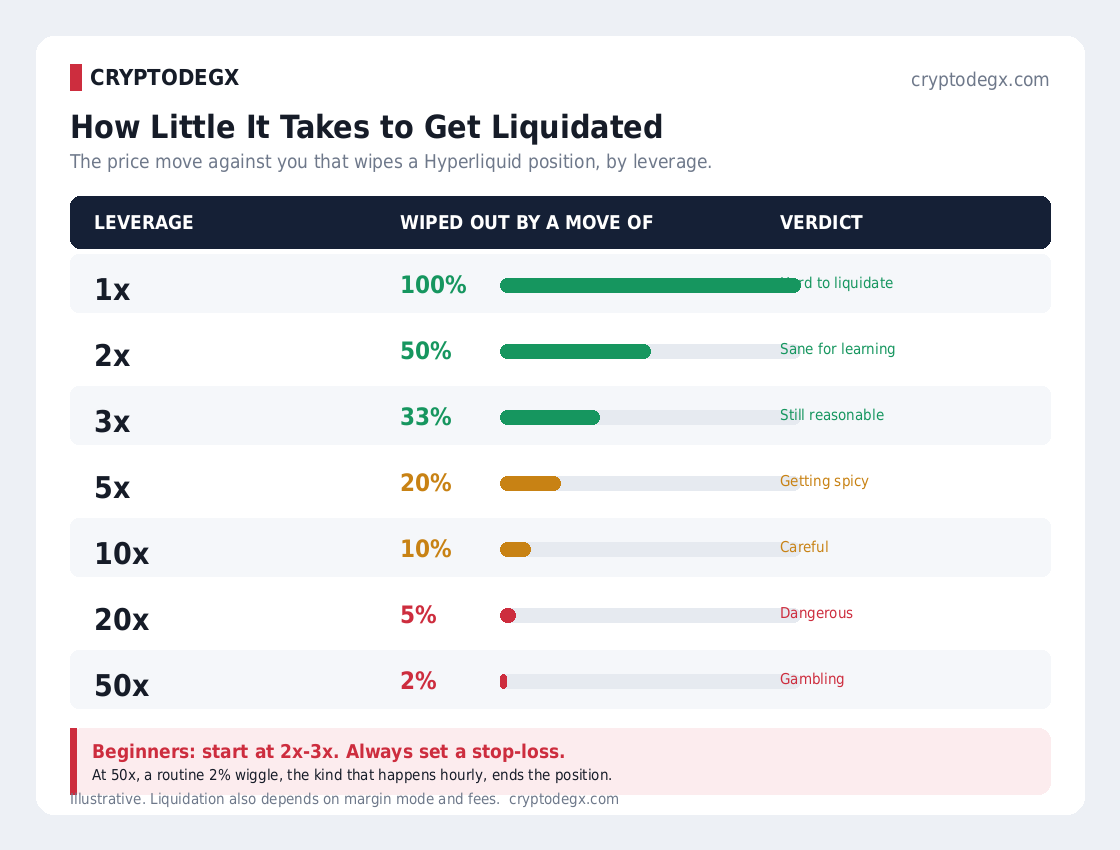
Pick a market (BTC-USD, ETH-USD, etc.), set your size, choose long or short, and set a stop-loss at the price where you’ll admit you’re wrong. The stop is not optional; it’s the difference between a small planned loss and a liquidation. Size the position so that hitting your stop costs only 1-2% of your account, the position-sizing rule that keeps traders alive. Then submit.
Watch your liquidation price (shown on the position), not just the entry. To exit, close the position; to cash out, use Withdraw, which bridges USDC back to Arbitrum. Funding rates are charged hourly on perps, so holding a position for days has a running cost worth knowing.
Common questions
How do I start using Hyperliquid?
Install an EVM wallet like MetaMask or Rabby, get USDC onto the Arbitrum network, go to app.hyperliquid.xyz, connect your wallet and approve the free signature, then click Deposit to bridge USDC in. From there you pick a market, set leverage, and place an order. The whole setup takes about five minutes, with no signup or KYC.
Do I need KYC to use Hyperliquid?
No. Hyperliquid requires no identity verification, email, or password; you connect a self-custody wallet and your wallet address becomes your account. An optional email login exists that creates a wallet for you, but even that involves no KYC document check.
What do I need to deposit on Hyperliquid?
USDC on the Arbitrum network, which is the platform’s collateral currency, plus a small amount of ETH on Arbitrum to pay the single deposit transaction’s gas. If your USDC is on another chain, bridge or swap it to Arbitrum first. The protocol minimum is tiny, but $50-100 is a realistic floor for sane position sizing.
What leverage should a beginner use on Hyperliquid?
As low as possible while learning, 2x-3x or even 1x, despite the platform offering up to 50x. Leverage multiplies losses as much as gains, and at high multiples a small adverse move liquidates the whole position. High leverage is the single most common reason new perp traders lose their deposit, so treat it as an advanced tool, not a starting point.
Is one-click trading on Hyperliquid safe?
It’s safe in that the session key it creates can only place trades, never withdraw your funds, but it does let orders execute without a wallet confirmation until it expires. Enable it only on trusted devices and disable it on shared or public machines. It’s the feature that gives Hyperliquid centralized-exchange speed, with that one boundary to respect.
How much money do I need to start?
Technically only a few USDC, but practically at least $50-100 so you can size positions properly rather than being forced into reckless leverage by a tiny balance. More important than the amount is that it’s money you could lose entirely without pain, since perpetuals carry real risk of exactly that.
How do I withdraw from Hyperliquid?
Close any open positions, then use the Withdraw function, which bridges your USDC back to the Arbitrum network, from where you can move it to an exchange or another wallet. Withdrawals are quick, and the clearest published fee is around $1 for native USDC back to Arbitrum. Match networks on any onward transfer and test with a small amount if it’s a new destination.
Is using Hyperliquid worth it for beginners?
The platform is beginner-friendly to set up but not beginner-friendly to trade, because its core product is leveraged perpetuals, which are high-risk regardless of how good the interface is. Beginners wanting simple price exposure are usually better served buying spot crypto elsewhere; Hyperliquid suits those who specifically want to trade perps and have learned position sizing and risk management first.