BitBox02 Review (2026): Dual-Chip Security, microSD Backups and Is the Nova Worth It?
 November 10, 2026
10 min read
Disclosure: This hardware wallet review is information and opinion, not financial or security advice. Firmware versions, prices and supported coins were checked against BitBox’s own pages and retailers in early November 2026 and can change. CryptoDEGX has no paid relationship with BitBox. See our full disclaimer.
Pick a hardware wallet and you usually end up choosing between two camps. Ledger uses a closed secure element chip. Trezor built its name on open-source hardware, and older models had no secure element at all. BitBox, made by Zurich-based Shift Crypto (now trading simply as BitBox), tried to get the best of both.
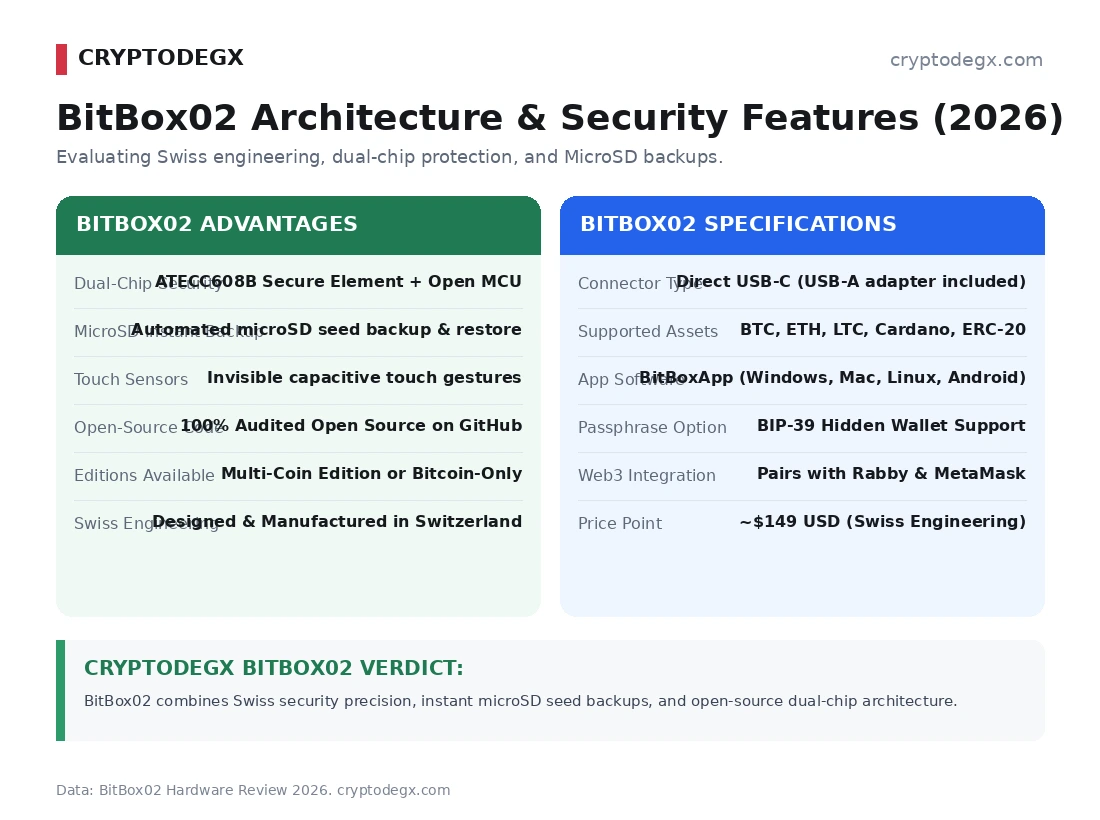
The BitBox02 pairs a secure chip with an open-source microcontroller and open-source firmware. It saves your backup to a microSD card instead of making you copy 24 words, and it comes in a Bitcoin-only edition for people who want nothing else on the device. There’s also a newer model now, the BitBox02 Nova, which finally works with iPhones.
It’s a very good wallet. But a few things in most BitBox02 reviews are simply wrong, starting with the microSD backup, and those details matter when it’s your savings. Here’s the honest breakdown.
Key takeaways
- The BitBox02 earns 4.0/5 and is a strong fit for Bitcoin savers and Android or desktop users who mainly hold BTC and ETH.
- Its seed is encrypted and requires secrets from two chips plus your device password to decrypt. The firmware is open source, with reproducible builds and anti-klepto protection.
- The microSD backup is not encrypted, so anyone who finds the card can restore the wallet. Store it separately from the device and make a second backup of your recovery words.
- The original BitBox02 does not work with iPhone or iPad. The Nova does, using Bluetooth, and adds an EAL6+ secure chip and a glass-covered display.
- Native support includes Bitcoin, Litecoin, Ethereum and selected ERC-20 tokens, but not Solana or XRP. Rabby works with EVM dApps, while MetaMask is not currently compatible.
- Firmware 9.26.5, released in August 2026, fixed two severe flaws. Update the device and download the BitBoxApp only from official sources.
BitBox02 at a Glance
| Spec | BitBox02 | BitBox02 Nova |
|---|---|---|
| Maker | BitBox (Shift Crypto AG), developed and made in Switzerland | |
| Secure chip | Microchip ATECC608B | Infineon OPTIGA Trust M V3 (EAL6+) |
| Display | OLED | OLED under scratch-resistant glass |
| Connection | USB-C | USB-C, plus Bluetooth for iPhone and iPad only |
| Phones | Android | Android, iPhone and iPad (iOS 16+) |
| Editions | Multi and Bitcoin-only | |
| Backup | microSD card (unencrypted) or 12/24 recovery words | |
| Price (Europe) | About €149 | About €175 |
Chip details and phone support come from BitBox’s own security page and support guides. European prices are typical retail; in Switzerland, Galaxus lists the BitBox02 at CHF 141 and the Nova at CHF 167, while BitBox’s own shop showed $171 and $201 when we checked.
How the Dual-Chip Security Actually Works
Here’s something many reviews get backwards. The secure chip doesn’t store your seed. The seed is stored encrypted on the main microcontroller, and decrypting it needs three separate secrets:
- A random secret held on the secure chip
- A random secret held on the microcontroller
- Your device password, which isn’t stored on the device at all
So a thief needs to beat both chips and know your password. The secure chip’s job is to make password guessing slow and limited. The microcontroller allows 10 attempts, and a counter in the secure chip acts as a backup limit if someone manages to bypass that. Even while you’re using the device, the seed stays encrypted in memory and is only decrypted briefly to sign.
Two more things worth knowing. All USB traffic between the BitBox and your computer is encrypted with the Noise protocol. And the BitBox02 supports anti-klepto, which stops a tampered device from leaking your private key through the signatures it creates. BitBox says it was the first hardware wallet to offer this.
On audits: BitBox says Census Labs audited the firmware, though no full public report has been published. The code is open source and the builds are reproducible, so anyone can check it.
The microSD Backup: Easy, but Not Encrypted
This is the BitBox02’s signature feature, and it really does make setup easier. You put the included card in, the device writes your backup, done. No copying 24 words with a shaky hand and hoping you spelled “abandon” right.
But the backup is not encrypted. BitBox is very clear about it: your device password protects the BitBox, not the card, and anyone who gets the card can restore your wallet and take your funds (BitBox Support). This is a deliberate choice. BitBox argues an encrypted backup you can’t open in an emergency is worse than a plain one, and that a passphrase gives you the same protection anyway.
Fair enough. Just treat that little card exactly like a paper seed phrase. In practice:
- Store the card away from the device. Never in the slot, never in the same drawer.
- Never put it in a computer. Only use it in your BitBox, except in a real emergency.
- Make a second backup. microSD cards can fail over years. You can show your recovery words on the device under Settings, then Manage device, then Show recovery words, and write them down or stamp them in steel.
- A passphrase isn’t on the card. If you use one, you need it separately to restore that wallet.
The good news: if you ever lose the device and only have the card, BitBox has an open-source offline tool that pulls the recovery words off it, so you’re not locked into buying another BitBox.
Which Coins Does BitBox02 Support?
Fewer than most people expect. Directly in the BitBoxApp you get Bitcoin, Litecoin, Ethereum and a curated list of ERC-20 tokens. That’s it. Solana and XRP are not supported at all (BitBox Support).
Through other wallets, the Multi edition also handles Cardano (via AdaLite or NuFi) and EVM chains like BNB Chain, Polygon, Arbitrum and Optimism through Rabby or MyEtherWallet (BitBox Support). For Bitcoin, it works with Sparrow and Electrum too.
And MetaMask? Not right now. BitBox says MetaMask paused new hardware wallet integrations, so the BitBox02 isn’t directly compatible. Rabby works the same way for dApps and connects fine.
If you hold SOL, XRP or a wide spread of altcoins, this isn’t your wallet. The Keystone 3 Pro covers much more.
BitBox02 vs BitBox02 Nova: Which One?
The Nova launched in 2025 and it’s the same idea with three upgrades: an EAL6+ certified secure chip, a glass-covered screen, and Bluetooth so it can talk to iPhones and iPads (BitBox).
That Bluetooth worries some people, so here are the facts. It runs on a separate DA14531 chip with its own firmware and no access to wallet secrets. It’s only used with iPhone and iPad, it uses authenticated pairing that you confirm on the device, and you can turn it off permanently. On desktop and Android it still uses USB. Note there’s no battery, so the Nova always needs a cable for power, even on an iPhone.
Our take: if you use an iPhone, get the Nova, because the original simply won’t work. If you’re on Android or desktop and want the cheapest way in, the original BitBox02 saves you around €25 and is still a great wallet.
The 2026 Firmware Flaws (and Why We’re Not Too Worried)
In August 2026, BitBox released its “Dixence” update, firmware 9.26.5, fixing two severe flaws its own team found during internal audits that included testing with AI models (BitBox blog):
- A memory corruption bug on Multi edition devices that hadn’t been set up yet, if plugged into a malicious computer. The Bitcoin-only edition doesn’t contain that code.
- A Silent Payments bug that could lock funds to the wrong address for a ransom attempt, but not steal them directly.
BitBox also said a bootloader flaw fixed in July could have let a phished user install malicious firmware on an original BitBox02. The Nova wasn’t exposed to that one. No stolen funds have been reported for any of them.
Honestly, this is how it should work. The team found its own bugs, fixed them and explained them in public. The lesson for you is simple: update your firmware, and only ever download the BitBoxApp from the official site.
BitBox02 vs Trezor Safe 5 vs Keystone 3 Pro
| Feature | BitBox02 | BitBox02 Nova | Trezor Safe 5 | Keystone 3 Pro |
|---|---|---|---|---|
| Price | ~€149 | ~€175 | $129 | $149 |
| Secure chip | ATECC608B | OPTIGA Trust M V3 (EAL6+) | OPTIGA Trust M V3 (EAL6+) | 3 secure elements |
| Screen and input | Small OLED, touch sliders | Small glass OLED, touch sliders | 1.54 in color touchscreen | 4 in color touchscreen, fingerprint |
| Connection | USB-C | USB-C, Bluetooth (iOS) | USB-C | Air-gapped QR codes |
| Backup | microSD or words | microSD or words | 20-word, multi-share option | Recovery words |
| Bitcoin-only option | Yes | Yes | Yes (firmware) | Yes (firmware) |
| Solana support | No | No | Yes | Yes |
Trezor specs and price come from Trezor’s product page; Keystone figures are from its official shop, and both brands confirm Solana support.
Pros and Cons
What we like
- Seed needs three secrets to decrypt, split across two chips and your password
- Fastest, least stressful setup we know of, thanks to the microSD backup
- Open-source firmware with reproducible builds and anti-klepto protection
- Bitcoin-only edition avoided one of the 2026 flaws entirely
- Tiny and discreet, with clean touch slider controls
- Nova adds iPhone support with a well-isolated Bluetooth design
What holds it back
- microSD backup is unencrypted, so the card is as sensitive as your seed
- No Solana, no XRP, and a short list of native coins
- Original BitBox02 doesn’t work with iPhone or iPad at all
- No direct MetaMask support right now
- Small screen makes long addresses slow to check
- Two severe firmware flaws fixed in 2026 mean updates are a must
Who the BitBox02 Is For
Great fit: Bitcoin savers who want a simple, well-built device. Get the Bitcoin-only edition. Also good for Android and desktop users holding BTC and ETH who value open-source code over a long coin list.
Get the Nova instead if: your main device is an iPhone or iPad, or you want the newer EAL6+ chip and the tougher glass screen.
Look elsewhere if: you hold Solana, XRP or lots of smaller altcoins, you want a big touchscreen, or you want fully air-gapped signing with no cable at all.
FAQ
Is the BitBox02 safe?
Yes, it’s one of the better-designed wallets. The seed is encrypted and needs secrets from two chips plus your password to unlock. BitBox fixed two severe firmware flaws in August 2026 with version 9.26.5 and reported no stolen funds, so keep your firmware updated.
Is the BitBox02 microSD backup encrypted?
No. The backup on the microSD card is not encrypted, and your device password doesn’t protect it. Anyone who gets the card can restore your wallet, so store it like a paper seed phrase and keep a second backup of your recovery words.
Does the BitBox02 work with iPhone?
The original BitBox02 doesn’t. Only the BitBox02 Nova works with iPhone and iPad, using Bluetooth with the BitBoxApp on iOS 16 or later. Both models work with Android over USB-C.
Does the BitBox02 support Solana or XRP?
No. BitBox says Solana and XRP are not supported. The BitBoxApp natively handles Bitcoin, Litecoin, Ethereum and selected ERC-20 tokens, with Cardano and other EVM chains available through third-party wallets.
Can I use BitBox02 with MetaMask or Rabby?
Rabby, yes. MetaMask, not currently. BitBox says MetaMask paused new hardware wallet integrations, so it recommends Rabby for Ethereum and EVM dApps.
BitBox02 or BitBox02 Nova?
Choose the Nova if you use an iPhone or iPad, or want the EAL6+ chip and glass display. Choose the original if you’re on Android or desktop and want to save around €25.